Original research Β· 2026 edition

We audited 25 e-commerce email programs. The leak was almost never the emails.

Between July 2025 and October 2026 we audited the email programs of 25 online brands on six different email platforms. The copy and design had problems. But most of the money was leaking from the plumbing underneath: who gets sent what, which automations actually run, and whether the list is still alive.

AUTOMATION Welcome series Draft YOUR STORE Shop now To: Entire list YOUR STORE New season drop Shop now No engagement segment Flow stuck in draft CTA below the fold
  • 8 separate problems in the median account
  • 22 of 25 sent campaigns without any engagement segment
  • 15 of 19 automation reviews where not one flow passed clean
  • 0.83% median click rate, below the 1% floor
Key findings

Five email marketing statistics from 25 audits

  1. 22 of 25 brands sent campaigns to their whole list or to static lists, with no engagement segment.
  2. In 15 of 19 automation reviews, not one flow passed without a fix.
  3. Median open rate was 38%, but median click rate was 0.83%, and 7 of 10 brands were under 1%.
  4. Winback was missing in 9 of 12 accounts we checked, and post purchase in 8 of 15.
  5. Two brands passed SPF, DKIM and DMARC on their own domain and still landed in Gmail spam.
What we looked at

25 accounts, read line by line

Every brand here asked us to review its email program, either before hiring us or in the first weeks of working together. We went through campaigns, automations, lists, sign up forms, deliverability and tracking, then wrote up what we found.

For this report we read all 25 audits again and coded each one against the same 18 problem areas. A problem only counts when the audit explicitly reported it. Where an audit could not check an area, for example because we only had view access, that brand counts as not found. So every number below is a floor. The real rates are likely higher.

Brands
25 online stores. Fully anonymised.
Period
July 2025 to October 2026
Categories
Jewelry, apparel, wigs, beauty and personal care, wellness, home textiles, hair accessories, digital goods, B2B parts
Platforms
Six different email platforms
Depth
20 full account audits. 5 partial, such as view only access or a post season review.
Excluded
9 audits of businesses that do not sell online, such as consultancies, lead generation and apps
Example audit Brand 14 of 25
Anonymised
  • Campaigns sent to the whole list Found
  • Email layout buries the call to action Found
  • A core automation missing or not sending Not an issue
  • Inbox placement problem Not checked
  • Sign up capture weak or broken Found
  • Tracking or attribution broken Not an issue

Plus 12 more problem areas

How each audit was coded

The same 18 problem areas for every brand. Each area gets one of three marks.

  • Found The audit reported the problem. It counts.
  • Not an issue We checked and it was fine. It does not count.
  • Not checked We had no access to that area, so it does not count either, even if the problem was there.

Only Found is counted, so every figure in this report is a minimum.

The ledger

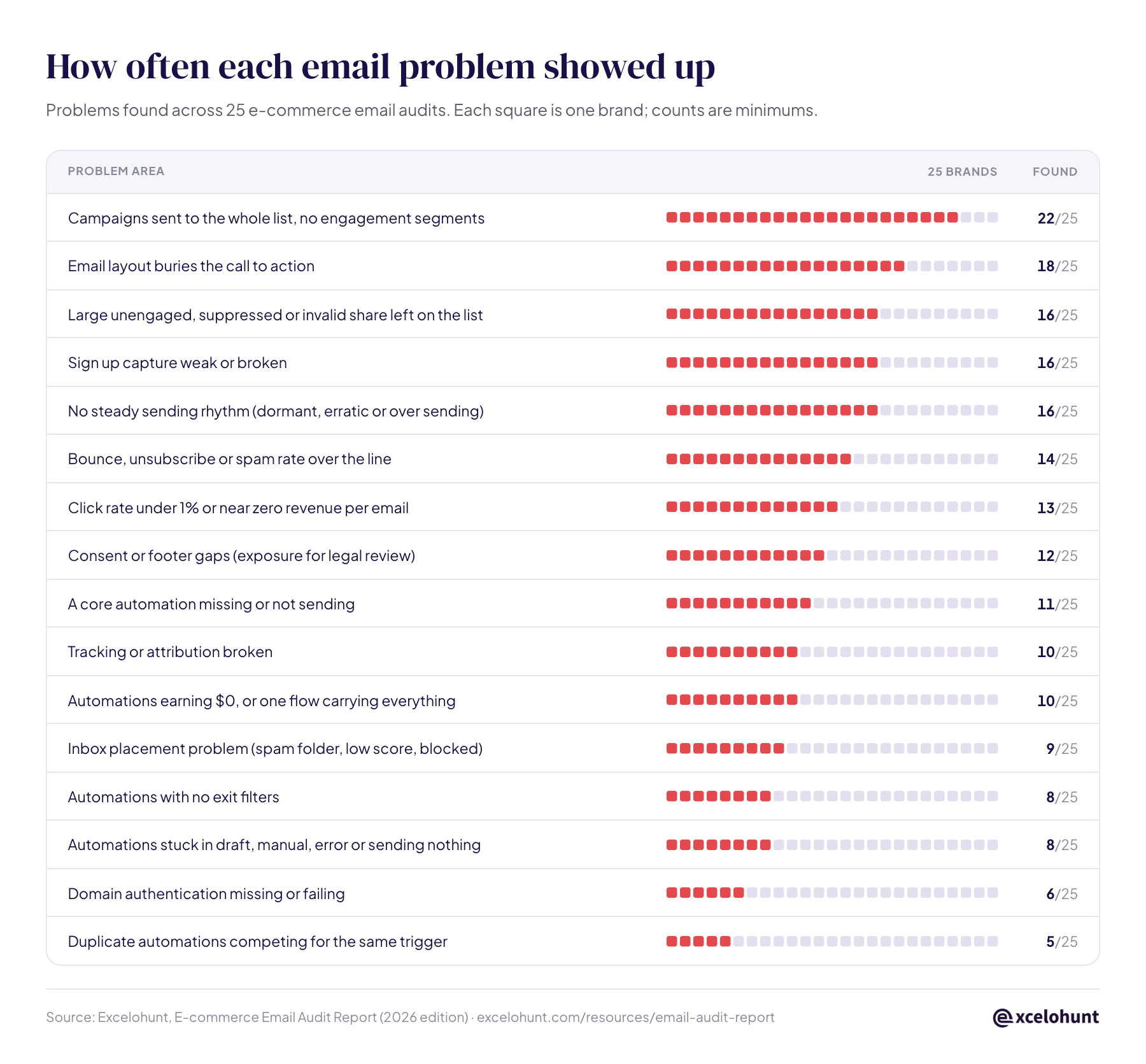
How often each email problem showed up

Each row is one problem area. Each square is one brand. A filled square means the audit found that problem in that account.

Problem area25 brandsFound
Campaigns sent to the whole list, no engagement segments 22/25
Email layout buries the call to action 18/25
Large unengaged, suppressed or invalid share left on the list 16/25
Sign up capture weak or broken 16/25
No steady sending rhythm (dormant, erratic or over sending) 16/25
Bounce, unsubscribe or spam rate over the line 14/25
Click rate under 1% or near zero revenue per email 13/25
Consent or footer gaps (exposure for legal review) 12/25
A core automation missing or not sending 11/25
Tracking or attribution broken 10/25
Automations earning $0, or one flow carrying everything 10/25
Inbox placement problem (spam folder, low score, blocked) 9/25
Automations with no exit filters 8/25
Automations stuck in draft, manual, error or sending nothing 8/25
Domain authentication missing or failing 6/25
Duplicate automations competing for the same trigger 5/25

Each square is one brand. Counts are minimums. Two areas were checked too rarely to rank: discount dependence (found in all 4 audits that assessed it) and the absence of A/B testing (all 3 that assessed it). Compliance observations are exposure for legal review, not legal advice.

What kept coming back

The 7 most common e-commerce email marketing mistakes

22/25 sent campaigns to the whole list or to static lists
30d 60d 90d 180d+ Silent majority Send here first

1. Everyone gets everything

This was the most common finding by a distance. Campaigns went to the full list, or to lists uploaded once and never refreshed. People who had not opened in a year got the same email, on the same day, as last week's customers. Inbox providers watch how recipients react, so mailing the silent majority drags down placement for everyone, including your best buyers.

From the auditsA hair accessories brand was sending more than 20 campaign emails per subscriber per month, with blasts reaching a few hundred thousand people. In one month it lost roughly 4.5% of its list to unsubscribes and spam complaints.

Fix: Build engagement tiers (30, 60, 90 and 180 days) and send most campaigns to the engaged tiers only. Open the full list for a handful of tentpole moments a year, if at all.


Read next: 10 Klaviyo segments that drive revenue

Share on LinkedIn
15/19 automation reviews with no flow that passed clean
Trigger Email 1 Wait 1 day Email 2 Draft: never sends Email 3 Exit Shows as live. Sends nothing.

2. Automations that exist on paper

Owners told us their flows were set up. The accounts told a different story. In 11 audits a core automation (welcome, abandoned cart or checkout, browse, post purchase) was missing or not sending. In 8, flows sat in draft, manual mode or error, or showed as live while sending nothing. In 8, flows had no exit filters, so people who had just bought, bounced or unsubscribed kept getting follow ups. In 5, two or more flows fought over the same trigger.

  • One store had 18 automations and none of them live.
  • A B2B parts brand had 9 of 14 "live" automations that never sent an email. They only moved people between lists.

Where the audit checked, winback was missing in 9 of 12 accounts and post purchase in 8 of 15. These are the flows that turn a first order into a second one.

Fix: List every automation with its trigger and status. Keep one flow per trigger. Add exit filters for purchase, bounce and unsubscribe. Then sign up and buy on your own site as a customer would, and check every email actually arrives.

Read next: How to build a Klaviyo winback flow

Share on LinkedIn
16/25 carried a large unengaged, suppressed or invalid share
Your list looks big Active Silent or suppressed Mail these then sunset the rest Small and engaged beats big and silent.

3. A list that is mostly dead weight

Many lists looked big and were mostly silent. A fashion jewelry brand had more suppressed profiles than active ones. A home textiles brand had more than half of its list suppressed. One account of roughly 650K profiles had about 400K that were inactive, suppressed or invalid.

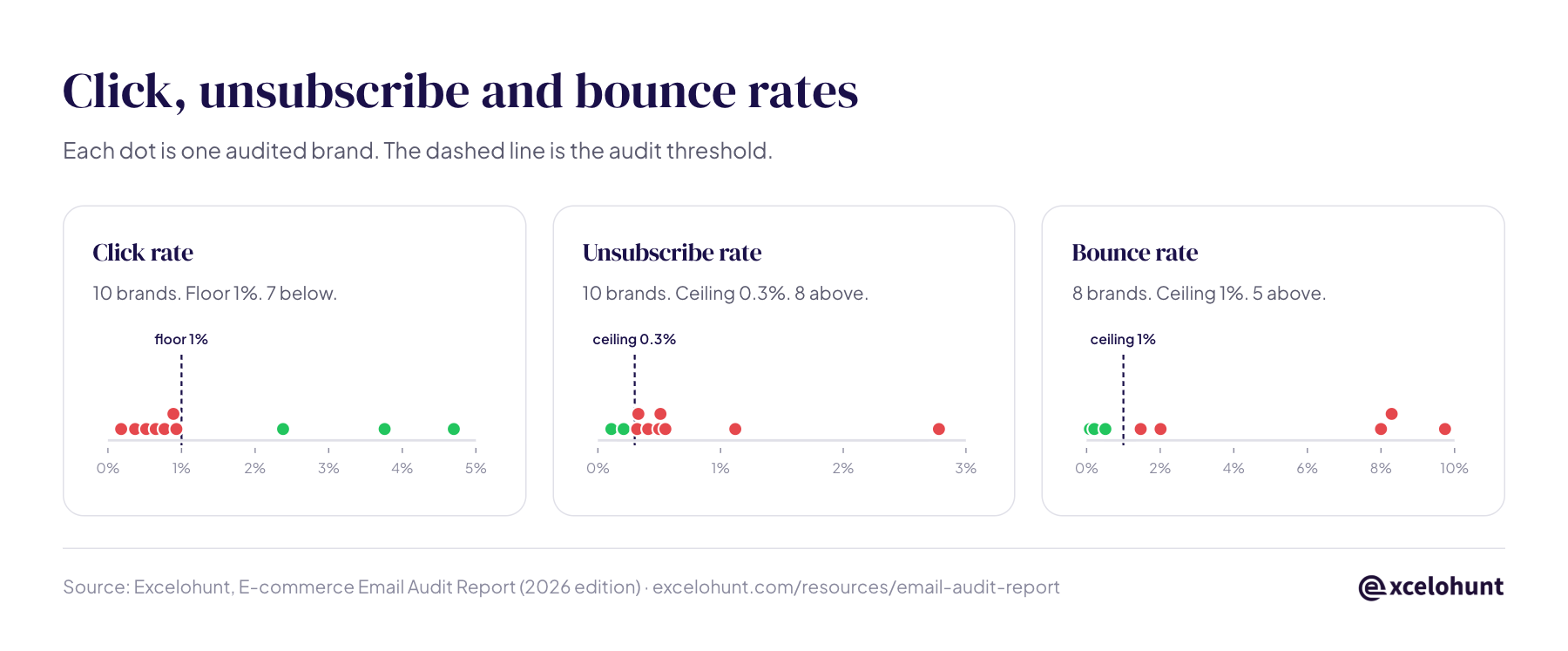
The rates follow. Of the 10 audits that recorded an unsubscribe rate, 8 were above 0.3%, with a median of 0.46%. Of the 8 that recorded a bounce rate, 5 were above 1%, and three were above 8%.

Fix: Run a sunset flow, build a never engaged segment, and suppress before you scale. A smaller list that opens is worth more to your sender reputation than a large one that does not.

Read next: How to clean your list with a sunset flow

Share on LinkedIn
9/25 had a documented inbox placement problem
SPF βœ“ DKIM βœ“ DMARC βœ“ Spam All three pass. Reputation already spent.

4. Authentication is not deliverability

Six brands had SPF, DKIM, DMARC or a branded sending domain missing or failing, and that needs fixing first. But the more useful finding is the opposite case. Two brands had all three records passing on their own domain and were still landing in Gmail spam, because their reputation had already been spent on mailing cold contacts.

Spam complaints were not the culprit. All 7 audits that recorded a complaint rate were under 0.1%, with a median of 0.014%. The damage came from bounces, unsubscribes and silence.

Fix: Treat authentication as the entry ticket, not the cure. Reputation is rebuilt by sending only to engaged people for several weeks and widening slowly.

Read next: How to build and repair sender reputation

Share on LinkedIn
0.83% median click rate across the 10 audits that recorded one
38% Median opens 0.83% Median clicks 1%

5. Opens flatter, clicks tell the truth

Median open rate was 38%, which looks healthy. Median click rate was 0.83%, and 7 of 10 brands were under 1%. Privacy features and security scanners now inflate opens, so an open rate on its own says very little. One luxury jewelry account showed a 79.7% open rate next to a 0.01% placed order rate.

From the auditsA fashion jewelry brand earned about $0.0015 per email delivered. A typical range for its category is $0.10 to $0.18, a gap of roughly 65 times.

Fix: Judge every send on click rate, placed order rate and revenue per recipient. Retire open rate as a success metric.

Read next: The Klaviyo metrics that actually matter

Share on LinkedIn
10/25 had broken tracking or attribution
Email share of web revenue 28% Dashboard default 3.87% On placed orders

6. The dashboard is not telling the truth

Store integrations switched off, on site tracking disabled, sign up forms running outside the email platform, order events missing. When the data is wrong, every decision built on it is wrong too. In 10 accounts automations earned nothing, or a single flow carried almost all the revenue. In one, the welcome series alone made 64% of flow revenue.

From the auditsA B2B parts brand's dashboard showed email driving 28% of web revenue. When we recalculated it on placed orders, the figure was 3.87%.

Fix: Before any strategy work, confirm that placed order events arrive, that attribution uses placed orders rather than fulfilment, and that every form feeds the email platform.

Read next: How to measure email revenue accurately

Share on LinkedIn
16/25 had weak or broken list capture
10% off Phone number Claim 691 views 0 sign ups

7. The front door leaks

No pop up at all, pop ups that convert at zero, every form left in draft, pop ups that ask only for a phone number, and pop ups that reveal the discount code on screen so nobody needs to open the welcome email. One mobile pop up had 691 views and 0 submissions.

Fix: One clear offer, email first, code delivered by email, and a test sign up every month to make sure the welcome flow fires.

Read next: How to build sign up forms that convert

Share on LinkedIn
18/25 had layouts that buried the call to action
first scroll Shop now

And the details that compound

Calls to action below the first scroll, emails long enough to be clipped by Gmail, and headlines baked into images were found in 18 of 25. Erratic sending, either dormant for months or bursts of several emails in a few days, showed up in 16. Consent or footer gaps, such as never subscribed contacts receiving marketing or a missing unsubscribe link, showed up in 12. That last group is exposure for legal review, not legal advice.

None of these is fatal alone. Together they are why the median account carried 8 separate problems, and why 14 of the 25 carried 8 or more.

Read next: How often to email your customers

Share on LinkedIn
Automation scorecard

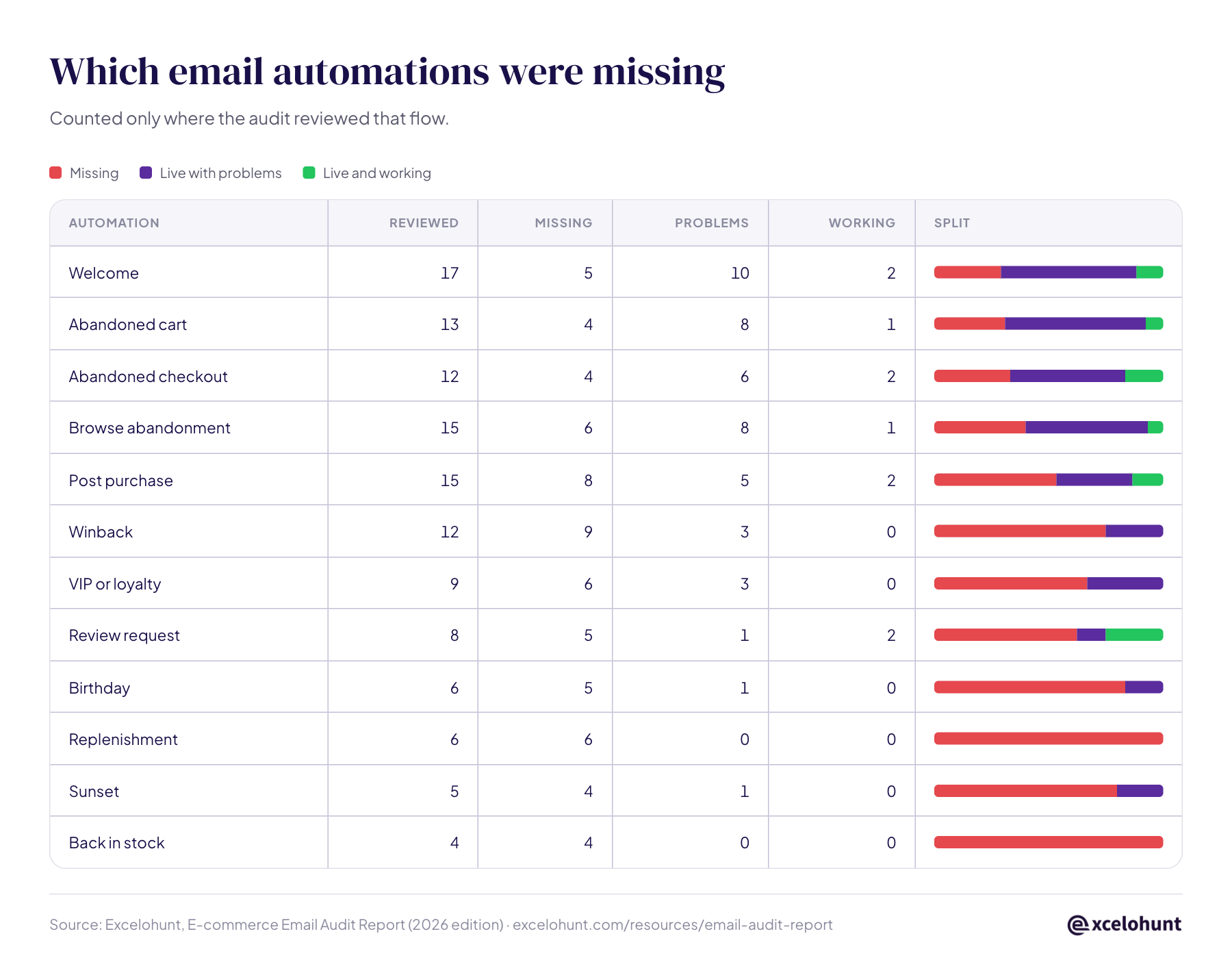
Which Klaviyo and email flows were missing

Winback was missing in 9 of 12 accounts we checked.

Counted only where the audit reviewed that flow. Very few flows passed review without a fix.

MissingLive with problemsLive and working
AutomationReviewedMissingProblemsWorkingSplit
Welcome 17 5 10 2
Abandoned cart 13 4 8 1
Abandoned checkout 12 4 6 2
Browse abandonment 15 6 8 1
Post purchase 15 8 5 2
Winback 12 9 3 0
VIP or loyalty 9 6 3 0
Review request 8 5 1 2
Birthday 6 5 1 0
Replenishment 6 6 0 0
Sunset 5 4 1 0
Back in stock 4 4 0 0

Two brands had no automation running at all. A third had automations switched on whose emails were stuck in draft, so nothing sent.

Build the flows that were missing most often: winback flow Β· post purchase flow Β· welcome flow Β· sunset flow

The numbers we could compare

Email click, unsubscribe and bounce rates in the audited accounts

Not every audit recorded every rate, so each chart shows only the brands where the figure was stated. Each dot is one brand. The dashed line is the threshold we audit against. For wider industry averages, see the e-commerce email marketing benchmarks.

Click rate

10 brands. Floor 1%. 7 below.
0% 1% 2% 3% 4% 5% floor 1% 0.18%0.37%0.52%0.65%0.77%0.89%0.93%2.38%3.76%4.7%

Unsubscribe rate

10 brands. Ceiling 0.3%. 8 above.
0% 1% 2% 3% ceiling 0.3% 0.11%0.21%0.32%0.33%0.41%0.5%0.51%0.55%1.12%2.78%

Bounce rate

8 brands. Ceiling 1%. 5 above.
0% 2% 4% 6% 8% 10% ceiling 1% 0.09%0.21%0.51%1.47%2.01%8%8.29%9.74%
The order matters

How to fix your email program, in order

Most brands start with the last step: a redesign, a new offer, better copy. That is why redesigns so rarely move revenue. New creative sent to a dying list, through broken automations, measured by a dashboard that overstates results, cannot show what it is worth.

  1. 1

    Make the numbers true

    Confirm order events, attribution on placed orders, and that every form feeds the platform.

  2. 2

    Stop the bleeding

    Fix authentication, suppress bounces and dead profiles, and switch on a sunset flow.

  3. 3

    Segment every send

    Engagement tiers on every campaign. The full list becomes the exception.

  4. 4

    Rebuild the core flows

    One flow per trigger, exit filters, then welcome, cart, checkout, browse, post purchase and winback.

  5. 5

    Fix the front door

    A working pop up with one clear offer, delivered by email.

  6. 6

    Then the creative

    Calls to action in the first scroll, shorter emails, live text instead of text in images.

Want us to do steps 1 to 3 for you? Get a free audit

Check your own account

Ten questions from the 25 audits

Tick the ones you can answer yes to with confidence.

0 / 10

Tick each statement that is true for your account.

Ravinderpal Singh, founder of Excelohunt
About the author

Ravinderpal Singh

Founder & CEO, Excelohunt

Seven years working only on email marketing, for 500+ e-commerce brands across 26+ countries. Author of Customer Retention Strategies, published on Amazon. He leads a Klaviyo Partner team that runs the audits behind this report.

β€œWithin the first 90 days, Excelohunt took email from about 12% of our revenue to just over 30, and the flows they built are still printing money months later.”
Andrew, CMO at StatusMove Andrew, CMO at StatusMove
β€œWhat really impressed me is how well they understand segmentation. They know exactly how to split the audience so the right message reaches the right people.”
Milan, CEO at Paradigm Milan, CEO at Paradigm
Your account

Want the same audit on your account?

  • The same 18 areas covered in this report
  • Your top 3 fixes, in the order that protects revenue
  • Free, with read only access

Get the 18-area audit checklist

The exact checklist behind this report, sent to your inbox.

Cite and share

Using these numbers? Here is everything you need

Writers, journalists and analysts are welcome to quote this research. Please link to this page as the source.

Suggested citation

Excelohunt, "E-commerce Email Audit Report: 25 Audits" (2026 edition). https://www.excelohunt.com/resources/email-audit-report/

Download the charts

Embed the ledger

Questions

Frequently asked questions

Every brand in this report asked Excelohunt to review its email program, either before hiring the team or in the first weeks of working together. Only businesses that sell online are included: 9 audits of consultancies, lead generation businesses and apps were excluded.

For e-commerce campaigns, treat 1% as the floor. Across the 10 audited brands that recorded a click rate, the median was 0.83% and 7 of 10 were below 1%; the three healthiest accounts sat between 2.4% and 4.7%. Judge sends on click rate, placed order rate and revenue per recipient rather than open rate.

Send campaigns to engaged segments instead of the whole list, put the call to action in the first scroll, keep emails short enough that Gmail does not clip them, and use live text rather than headlines baked into images. In the audits, buried calls to action showed up in 18 of 25 accounts and whole list sends in 22 of 25.

Build engagement segments β†’

Build engagement tiers at 30, 60, 90 and 180 days, run a sunset flow that tries to win quiet subscribers back, and then suppress profiles that have not opened or clicked in 90 to 180 days. Do it continuously, not once a year.

No. They are the entry ticket, not the cure. Two brands in this report passed all three on their own domain and still landed in Gmail spam, because mailing cold contacts had already damaged their sender reputation.

In the audits, falling open rates usually came from the list, not the subject lines: campaigns sent to people who had not engaged in months, a growing share of dead or suppressed profiles, and reputation damage from bounces and unsubscribes. Privacy features also inflate and distort opens, so track click rate and revenue per recipient alongside them.

How to fix declining open rates β†’

A sunset flow is an automation that targets subscribers who have stopped opening or clicking, gives them a last chance to stay, and then suppresses the ones who do not respond. It protects sender reputation, which is why the fix for a list that is mostly dead weight starts with one.

Read the sunset flow guide β†’

At minimum: placed order tracking and attribution, list health and suppression, engagement segments on every campaign, every core flow and its exit filters, domain authentication and inbox placement, sign up capture, and email layout. The 25 audits in this report were coded against 18 such areas.

See the Klaviyo audit checklist β†’

Yes. Excelohunt checks the same 18 areas covered in this report and tells you which three to fix first, in the order that protects revenue. The audit is free.

Get your free audit β†’
1