Klaviyo Flows: The Complete 2026 Guide
Quick answer: Klaviyo flows are automated email and SMS sequences triggered by customer behavior — like starting a checkout, signing up, or going quiet. Unlike one-off campaigns, flows run 24/7 on autopilot and typically drive 30%+ of an ecommerce brand’s email revenue from a handful of well-built sequences. The 12 flows below are the ones every store should build, roughly in priority order.
Key takeaways
- A flow is automated and behavior-triggered; a campaign is a one-time broadcast. Flows are where the compounding revenue is.
- Every flow is built from four parts: a trigger, optional flow filters, time delays, and conditional splits that branch the path.
- The 12 essential flows cover the whole customer lifecycle — acquire, convert, deliver, grow, retain.
- Judge flows by revenue per recipient and their share of total email revenue, not opens.
- Most “underperforming” flows aren’t broken — they’re missing conditional splits, sending to converters, or have Smart Sending left on where it shouldn’t be.
Klaviyo flows are the single highest-leverage thing an ecommerce brand can build in its email program. Set them up once, and they keep recovering carts, welcoming subscribers, and winning back lapsed buyers without anyone touching them. This guide covers what flows are, how they actually work under the hood, the 12 to build (and in what order), and how to measure whether they’re pulling their weight.
What are Klaviyo flows (and how do they differ from campaigns)?
A Klaviyo flow is an automated sequence of emails and/or SMS messages that sends to a person automatically when they take a specific action. A campaign, by contrast, is a single message you write and broadcast to a segment at a point in time (a sale announcement, a newsletter).
The distinction matters because the two do different jobs:
- Campaigns drive spikes — they’re great for launches, promotions, and timely news, but every send is manual work and the revenue stops when you stop sending.
- Flows drive a baseline — they fire on each customer’s individual timeline (the moment they abandon a cart, their 90-day lapse point), so they compound quietly in the background and scale with traffic, not with your team’s effort.
For most ecommerce brands, a small set of flows ends up producing around a third of total email revenue despite being a fraction of the sends. That’s the whole reason to start with flows before you pour energy into campaigns.
How do triggers, filters, and conditional splits work?
Every flow, no matter how complex, is assembled from the same four building blocks. Understanding them is what separates a basic linear sequence from an expert one.
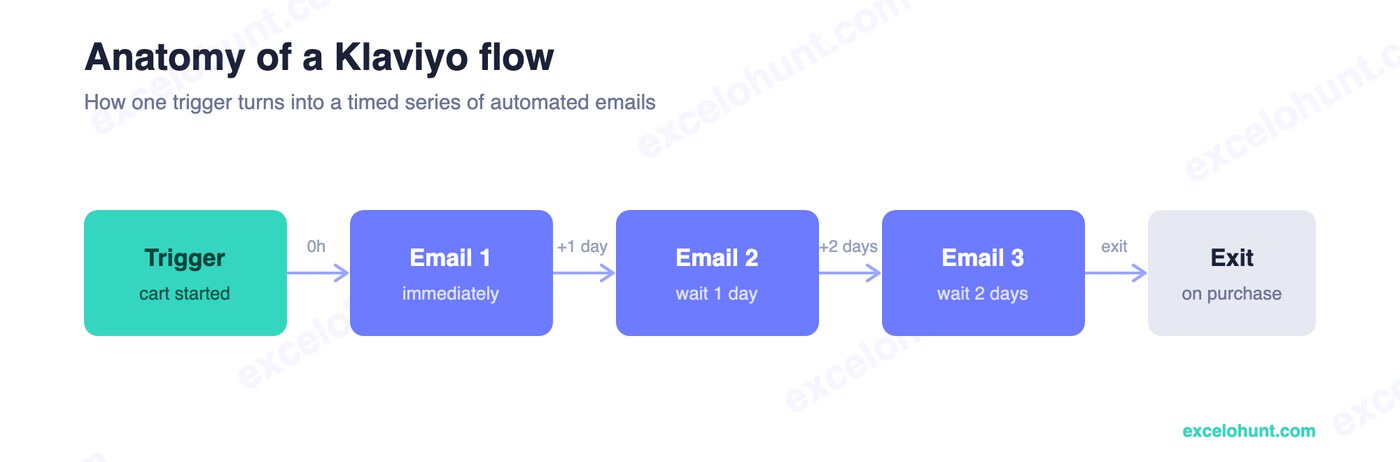
- Trigger — the event that starts the flow for a person. Common triggers are Checkout Started, Placed Order, list/segment membership, or a Viewed Product event. The trigger defines when someone enters.
- Flow filters — global conditions checked the whole time someone is in the flow. The classic example: “skip anyone who has placed an order since entering,” so a buyer doesn’t keep getting cart reminders.
- Time delays — the waiting periods between messages (wait 1 hour, wait 2 days). Timing is a lever, not an afterthought — it’s how a flow feels helpful instead of pushy.
- Conditional splits — yes/no branches that send different people down different paths. “Opened the last email?” or “Placed an order?” let one flow behave like several, personalized to each customer’s behavior.
An expert flow is mostly splits and exits: it constantly checks whether the goal is already met (purchased, re-engaged) and routes people out, so you never email someone a discount they no longer need.
If you want the deeper mechanics of a single sequence, the Klaviyo abandoned cart flow guide walks through filters, delays, and splits on a real example. Klaviyo’s own flow branching documentation is the authoritative reference for how splits evaluate.
The 12 Klaviyo flows every store needs
Here’s the master map: the 12 flows mapped to where they fire in the customer lifecycle. Build them roughly left-to-right, top to bottom — pre-purchase flows usually pay back fastest.
🗺️ Want to see where every one of these flows sits in the full customer journey? Explore our free interactive ecommerce customer journey map — all 38 touchpoints with their triggers, timing and exit rules in one zoomable picture.
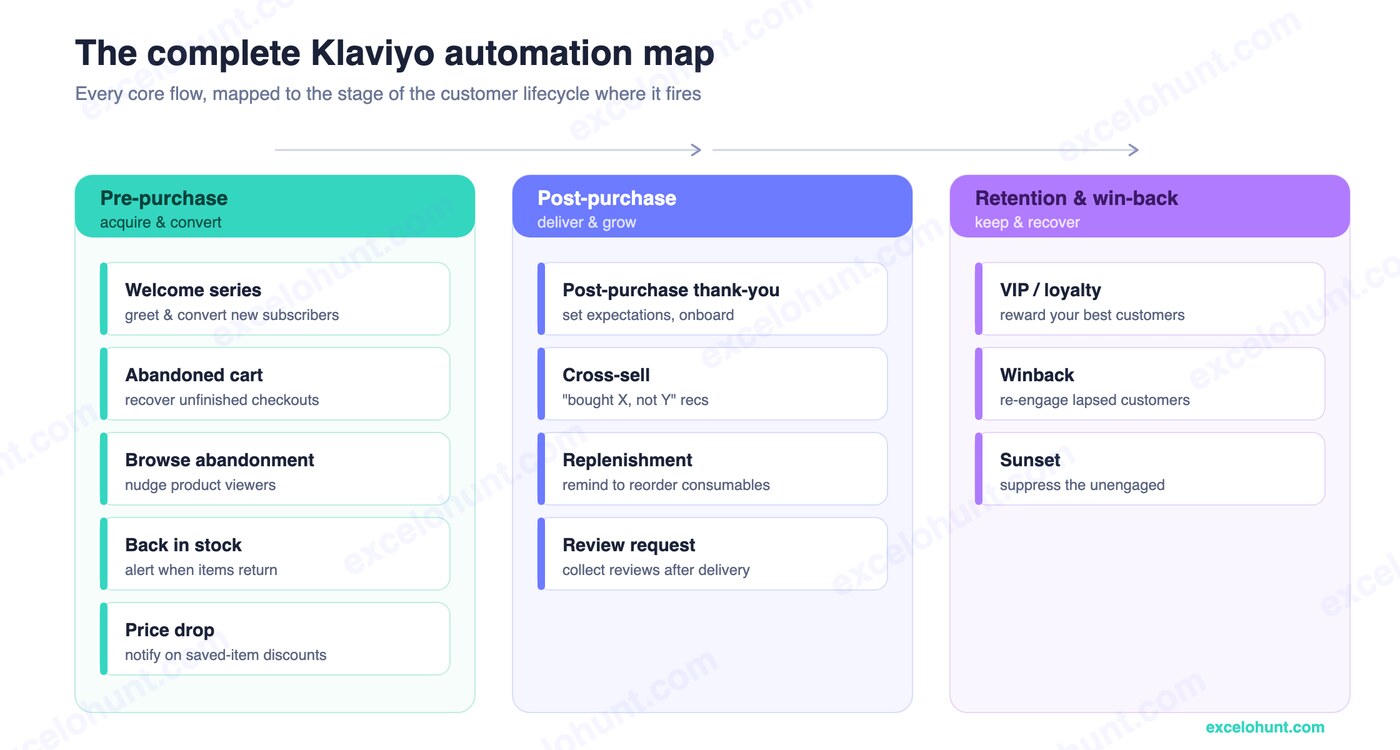
The table below is your build checklist. Start at the top: the first four flows typically capture the bulk of automated revenue.
| # | Flow | Trigger | What it does | Priority |
|---|---|---|---|---|
| 1 | Welcome series | Signed up | Greets new subscribers, delivers the offer, converts first purchase | Highest |
| 2 | Abandoned cart | Checkout started | Recovers shoppers who didn’t finish checkout | Highest |
| 3 | Browse abandonment | Viewed product | Nudges shoppers who looked but didn’t add to cart | High |
| 4 | Post-purchase | Order placed / fulfilled | Onboards buyers, cross-sells, requests reviews | High |
| 5 | Winback | Lapsed past buying cycle | Re-engages customers who’ve gone quiet | High |
| 6 | Back in stock | Item restocked | Alerts shoppers when a sold-out item returns | Medium |
| 7 | Price drop | Saved item discounted | Notifies on price cuts to drive urgency | Medium |
| 8 | Replenishment | Time since purchase | Reminds to reorder consumables | Medium |
| 9 | Cross-sell | Bought product X | Recommends complementary products | Medium |
| 10 | Review request | Order delivered | Collects reviews and UGC after delivery | Medium |
| 11 | VIP / loyalty | High lifetime value | Rewards and retains your best customers | Lower |
| 12 | Sunset | Unengaged 90+ days | Cleans the list to protect deliverability | Ongoing |
A few notes on sequencing:
- The “big four” — welcome, abandoned cart, browse abandonment, and post-purchase — should be live before you do anything else. They cover the two moments of highest intent (signup and checkout) and the moment of highest repeat-purchase potential (just after an order).
- Segmentation amplifies all of them. Flows only fire if the right people qualify, which is why getting your Klaviyo segments right multiplies flow performance.
- The sunset flow is non-optional. It runs in the background removing dead weight so your other flows keep landing in the inbox — see the Klaviyo deliverability guide for why email engagement (not website browsing) is the signal that matters.
How do you set up your first Klaviyo flow?
If you’re starting from zero, build the welcome series first — it has the highest open rates of any flow (welcome emails average around 50% opens) and the clearest payoff. Here’s the process that applies to any flow:
- Open the flow library. In Klaviyo, go to Flows → Create Flow and pick a pre-built template (or start from scratch). Templates give you a sensible structure to edit rather than a blank canvas.
- Set the trigger. For a welcome series, trigger on someone joins a list (your newsletter/popup list). For a cart flow, trigger on Checkout Started.
- Add a flow filter. Add the guardrail conditions — e.g., for the cart flow, “has not placed an order since starting this flow.” This is what stops converters from getting nagged.
- Build the emails with delays between them. A welcome series of three emails — immediate, +2 days, +4 days — is the proven baseline. Write each email to do one job.
- Add conditional splits. Before each follow-up, check “placed an order?” and route buyers to an exit. For engagement-based branching, split on “opened the previous email?” to send re-engaged vs cold paths.
- Turn off Smart Sending where it hurts. On cart and checkout flows specifically, Smart Sending can suppress time-sensitive messages — turn it off there.
- Test, then set live. Send yourself through the flow, check the rendering on mobile, then switch it from Draft to Live.
For the full beginner walk-through of the platform itself, see how to use Klaviyo.
Flow timing and A/B testing: getting the details right
Timing is the most underrated lever in any flow. The same three emails can recover wildly different amounts of revenue depending on when they land. A few field-tested defaults:
- Abandoned cart: first email ~30–60 minutes after abandonment (not the next day — intent decays fast), then +24h and +48h.
- Welcome: email one immediately (they just raised their hand), then +2 days, +4 days.
- Winback: trigger on the customer’s last order and wait longer than your average time-between-orders, so you only nudge people who’ve genuinely lapsed.
On testing: the highest-leverage A/B test in most flows is the subject line, because open rate sets the ceiling on everything downstream. Specific beats clever — “Your cart’s about to expire” tends to out-open “Don’t miss out.” Klaviyo lets you A/B test subject lines and even split entire flow paths, so you can test a discount branch against a no-discount branch and keep the winner. For the broader playbook, see our Klaviyo best practices.
How do you measure Klaviyo flow revenue?
The metric that matters is revenue per recipient, and the headline number is what share of your total email revenue comes from flows vs campaigns. Healthy ecommerce accounts often see flows contribute 30%+ of email revenue despite far fewer sends — because flows hit people at peak intent.
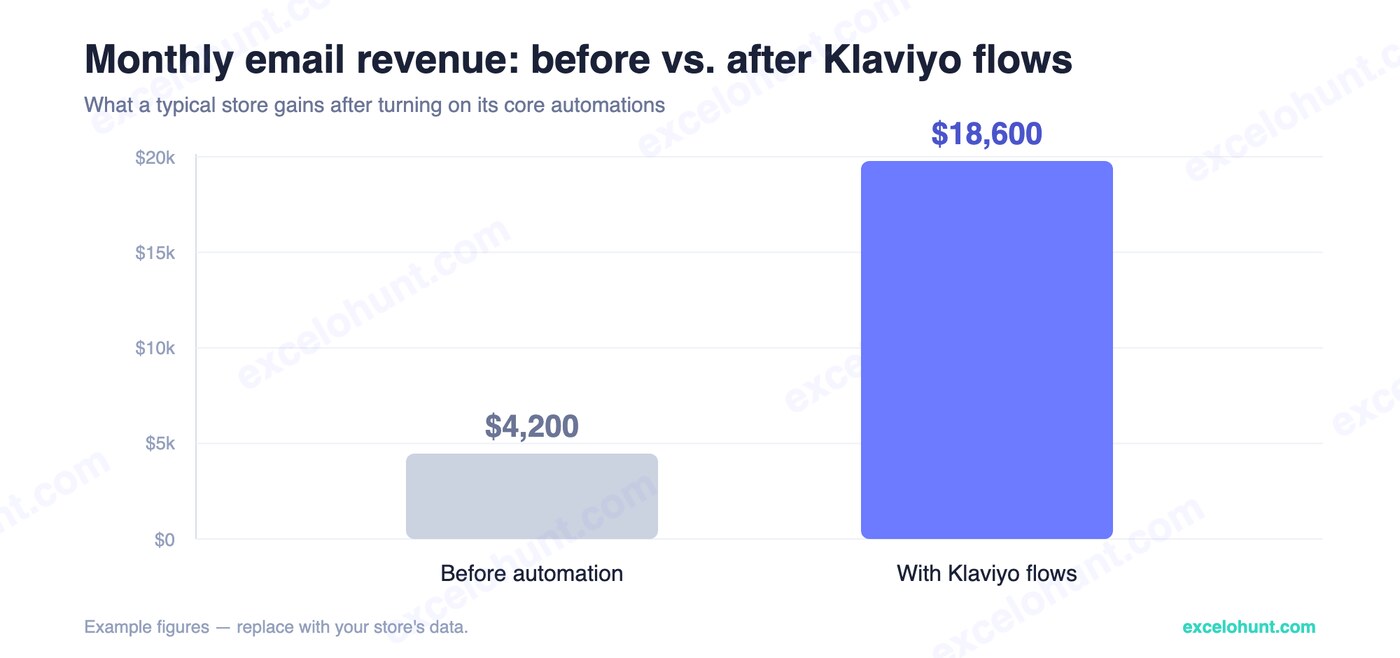
When you review flow performance, look at:
- Revenue per recipient (RPR) — the truest ranking of which flow (and which email within it) earns its place.
- Flow share of email revenue — track flows-vs-campaigns monthly; if flows are under ~25%, you have headroom.
- Conversion rate per email — find the message that’s carrying the flow and the one that’s dead weight.
- Deliverability signals — open rate and spam complaints, because a flow that erodes your sender reputation costs you everywhere.
Don’t optimize on open rate alone; with privacy changes inflating open numbers, RPR and placed-order rate are far more honest. The full breakdown lives in our guide to Klaviyo metrics that actually matter.
Klaviyo flow mistakes to avoid
In audits, the same handful of issues show up again and again:
- No conditional splits. The flow keeps emailing people who already bought. Add a “placed an order?” check before every send.
- Smart Sending left on for cart/checkout. It suppresses time-sensitive recovery emails. Turn it off there.
- One linear path for everyone. First-time visitors and loyal repeat buyers have different objections — split on purchase history and speak to each.
- Discounting everyone. Offer a code only to first-time buyers or high-value carts; full-price buyers don’t need it, and training your list to wait for discounts erodes margin.
- No sunset flow. Without it, unengaged contacts drag your deliverability down and your good flows stop reaching the inbox.
- Judging flows by opens. Opens are noisy; revenue per recipient is the number.
Fixing these usually recovers more revenue than building a brand-new flow does.
Flow deep dives
Each of the core flows above has its own step-by-step build guide:
- Welcome series — structure, timing, and the offer email that converts first purchases
- Abandoned cart — the 4-email recovery sequence with conditional splits by cart value
- Browse abandonment — catching viewers who never add to cart, without double-sending
- Post-purchase — onboarding, cross-sell, and review-request timing after the order
- Winback — defining “lapsed,” the incentive ladder, and the sunset hand-off
Frequently asked questions about Klaviyo flows
How many Klaviyo flows should I have?
Start with the “big four” — welcome, abandoned cart, browse abandonment, and post-purchase — then add winback and a sunset flow. Most stores run 6–12 flows in total. Quality and correct splits matter far more than quantity.
What’s the difference between a Klaviyo flow and a campaign?
A flow is automated and triggered by an individual’s behavior, so it runs continuously on each customer’s own timeline. A campaign is a single message you broadcast to a segment at one point in time. Flows build a revenue baseline; campaigns create spikes.
Which Klaviyo flow makes the most money?
For most ecommerce brands it’s the abandoned cart and welcome flows, because they fire at the two highest-intent moments — checkout and signup. Post-purchase and winback then drive the most repeat revenue over a customer’s lifetime.
Do Klaviyo flows include SMS?
Yes. Klaviyo unifies email and SMS in the same flow, so you can add an SMS step inside any flow (for consented subscribers) — for example an SMS nudge 30–90 minutes into an abandoned cart flow. See our Klaviyo SMS marketing guide for consent and compliance.
How long does it take to set up Klaviyo flows?
You can launch a solid welcome and abandoned cart flow in an afternoon using templates. Building all 12 flows with proper conditional splits, segmentation, and A/B tests is more like a focused 2–4 week project — which is what a Klaviyo audit typically maps out.
About the author
Ravinderpal Singh is the founder of Excelohunt, a Klaviyo-focused email & SMS agency that builds and optimizes ecommerce automation for DTC brands. The flows and benchmarks above come from accounts we’ve built and audited in the field.
Want all 12 flows built and optimized for your store? Book a free Klaviyo audit and we’ll map exactly which flows are missing revenue — and fix them.
More in Klaviyo
- 12 Best Klaviyo Agencies in 2026 (Honest Comparison)
- Klaviyo Agency Pricing: What You Should Pay in 2026
- Optimite Alternatives: Klaviyo Email Agencies Compared (2026)
- How to Set Up Klaviyo: Complete Setup Guide (Step-by-Step)
- How to Use Klaviyo: A Beginner's Guide (2026)