Quick answer: To use Klaviyo: connect your store, build your list with a signup form, then learn the two things that drive revenue — campaigns (one-time broadcasts to a segment) and flows (automated, behavior-triggered sequences). Start by sending one campaign to an engaged segment and turning on the welcome and abandoned cart flows, then read the dashboard to see what’s working. This guide gives you a 30-day plan to do exactly that.
Key takeaways
- Klaviyo has two send types: campaigns (manual broadcasts) and flows (automations).
- Connect your store first — your data powers everything.
- Build a list with a signup form, then greet subscribers with a welcome flow.
- Judge results by revenue per recipient, not just opens.
- Follow the 30-day plan below to go from zero to a working program.
New to Klaviyo and not sure where to start? This is your end-to-end orientation — no jargon, just the path from empty account to working email program.
What is Klaviyo (in one paragraph)?
Klaviyo is an ecommerce email and SMS platform built around your store’s customer data. It connects to Shopify (and others), pulls in every order, view, and click, and lets you turn that data into targeted campaigns and automated flows. Its edge over a basic email tool is data depth — for the full picture, see what Klaviyo is.
Step 1: Account and store setup
Connect Klaviyo to your store, let it sync your historical data, and authenticate a sending domain so your emails reach the inbox. This is the foundation — we cover it step by step in how to set up Klaviyo. Don’t skip the domain authentication.
Step 2: Build your list
Add a signup form (popup or flyout) offering a clear incentive to capture subscribers and SMS consent. Your list is who you’ll email, so growing it is priority one — details in our signup forms guide.
Step 3: Create your first campaign
A campaign is a one-time send. To create one: choose Campaigns → Create Campaign, pick a segment (start with your engaged subscribers, not the whole list), design the email, set the subject line, and send or schedule it. Sending to an engaged segment first protects your deliverability while you find your feet.
Step 4: Build your first flow
A flow is an automation that runs on its own. Your first should be the welcome series: trigger it on list signup, add three emails with delays, and let it greet every new subscriber automatically. This is where Klaviyo’s real value kicks in — see the welcome flow guide and the complete flows guide for what to build next.
Step 5: Read the dashboard
Klaviyo’s analytics can overwhelm beginners. Focus on three numbers:
- Revenue per recipient — the truest measure of a send’s success.
- Flow vs campaign revenue — are your automations pulling their weight?
- Open and click trends — directional health signals (treat opens as noisy).
Ignore vanity metrics; optimize on revenue.
Your 30-day starter plan
Follow this week-by-week and you’ll have a real program in a month:
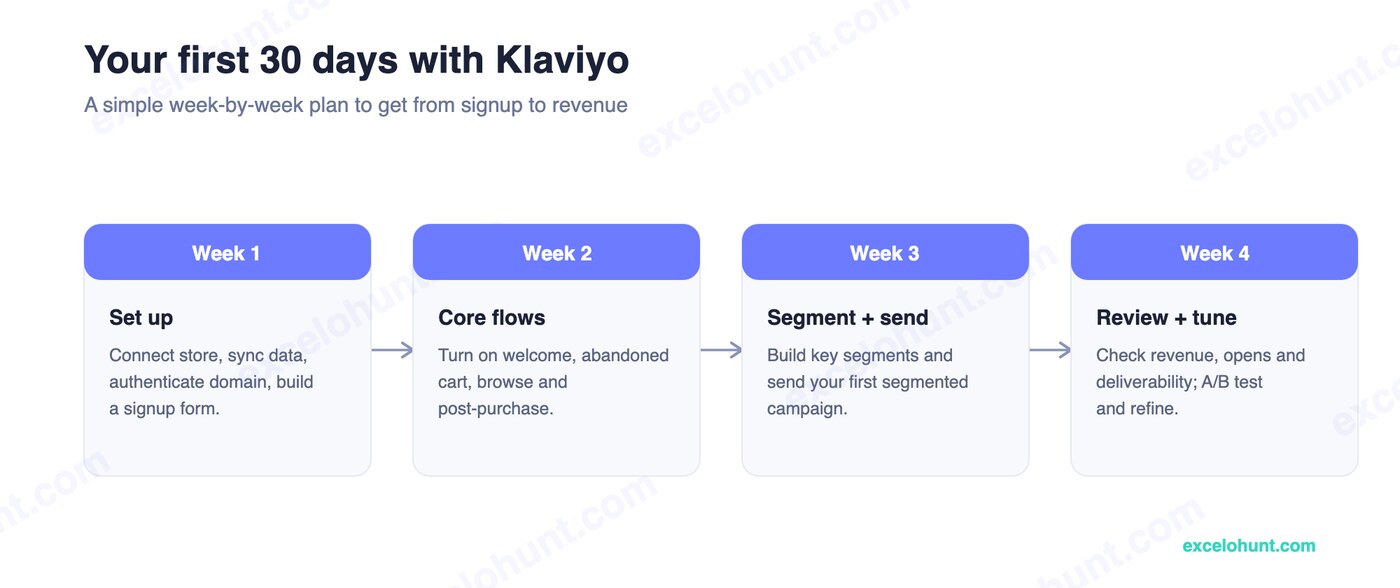
- Week 1 — Set up: connect the store, sync data, authenticate your domain, build a signup form.
- Week 2 — Core flows: turn on welcome, abandoned cart, browse, and post-purchase.
- Week 3 — Segment + send: build your key segments and send your first segmented campaign.
- Week 4 — Review + tune: check revenue, opens, and deliverability; A/B test and refine.
When to bring in an expert
DIY gets you a long way, and this plan will have you sending. Bring in help when you want to scale — advanced flow logic, predictive segmentation, deliverability diagnostics, and squeezing more revenue per send. That’s when an audit pays for itself. Klaviyo’s Academy is also a good free learning resource as you grow.
Frequently asked questions
Is Klaviyo hard to use for beginners?
It has a learning curve because it’s powerful, but the basics — connecting your store, building a list, sending a campaign, and turning on a welcome flow — are approachable in your first week. The 30-day plan above keeps it manageable.
What’s the difference between a campaign and a flow in Klaviyo?
A campaign is a one-time message you broadcast to a segment. A flow is an automated sequence triggered by behavior (like signing up or abandoning a cart) that runs continuously on each customer’s own timeline. You need both.
What should I do first in Klaviyo?
Connect your store and let it sync data, then build a signup form and turn on a welcome flow. After that, send one campaign to your engaged segment. The 30-day plan sequences the rest.
Do I need to know how to code to use Klaviyo?
No. Klaviyo’s drag-and-drop editor and flow builder require no coding. Templates handle design, and the integrations handle data — you focus on strategy and copy.
About the author
Ravinderpal Singh is the founder of Excelohunt, a Klaviyo-focused email & SMS agency. We onboard brand-new Klaviyo users and run accounts done-for-you.
Short on time? Our team runs Klaviyo for you, done-for-you.
More in Klaviyo
- 12 Best Klaviyo Agencies in 2026 (Honest Comparison)
- Klaviyo Agency Pricing: What You Should Pay in 2026
- Optimite Alternatives: Klaviyo Email Agencies Compared (2026)
- How to Set Up Klaviyo: Complete Setup Guide (Step-by-Step)
- Best Klaviyo Alternatives in 2026 (Honest Comparison)
Want Us to Implement This for Your Brand?
Get a free email audit and see exactly where you're losing revenue.
Get Your Free Audit