Klaviyo Deliverability: How to Land in the Inbox
Quick answer: Klaviyo deliverability comes down to three things: authenticate your domain (SPF, DKIM, DMARC on a dedicated sending domain), only send to people who engage, and keep your list clean with a sunset flow. Mailbox providers decide inbox-vs-spam largely on engagement and sender reputation — so sending great content to an engaged audience from an authenticated domain is what lands you in the inbox.
Key takeaways
- Authentication is table stakes: SPF, DKIM, and DMARC on a dedicated sending domain.
- Engagement is the real signal — define “unengaged” by email opens/clicks, not website browsing.
- A sunset flow that suppresses dead contacts protects every other send.
- Warm up new domains gradually, starting with your most engaged subscribers.
- If you’re already in spam, there’s a recovery plan — but it takes weeks of disciplined sending.
Open rates sliding? Emails landing in spam? Deliverability is the quiet killer of email programs — you can have perfect flows and still earn nothing if no one sees them. This guide is a cluster of our complete Klaviyo flows guide.
What actually drives deliverability?
Two things: authentication (proving you are who you say) and reputation (how people react to your email). Authentication is a one-time technical setup. Reputation is ongoing — it’s built by sending wanted email to people who open and click, and destroyed by blasting unengaged lists. Everything below serves one of those two goals.
SPF, DKIM and DMARC explained
These three DNS records authenticate your email. Set all three up before sending at volume:
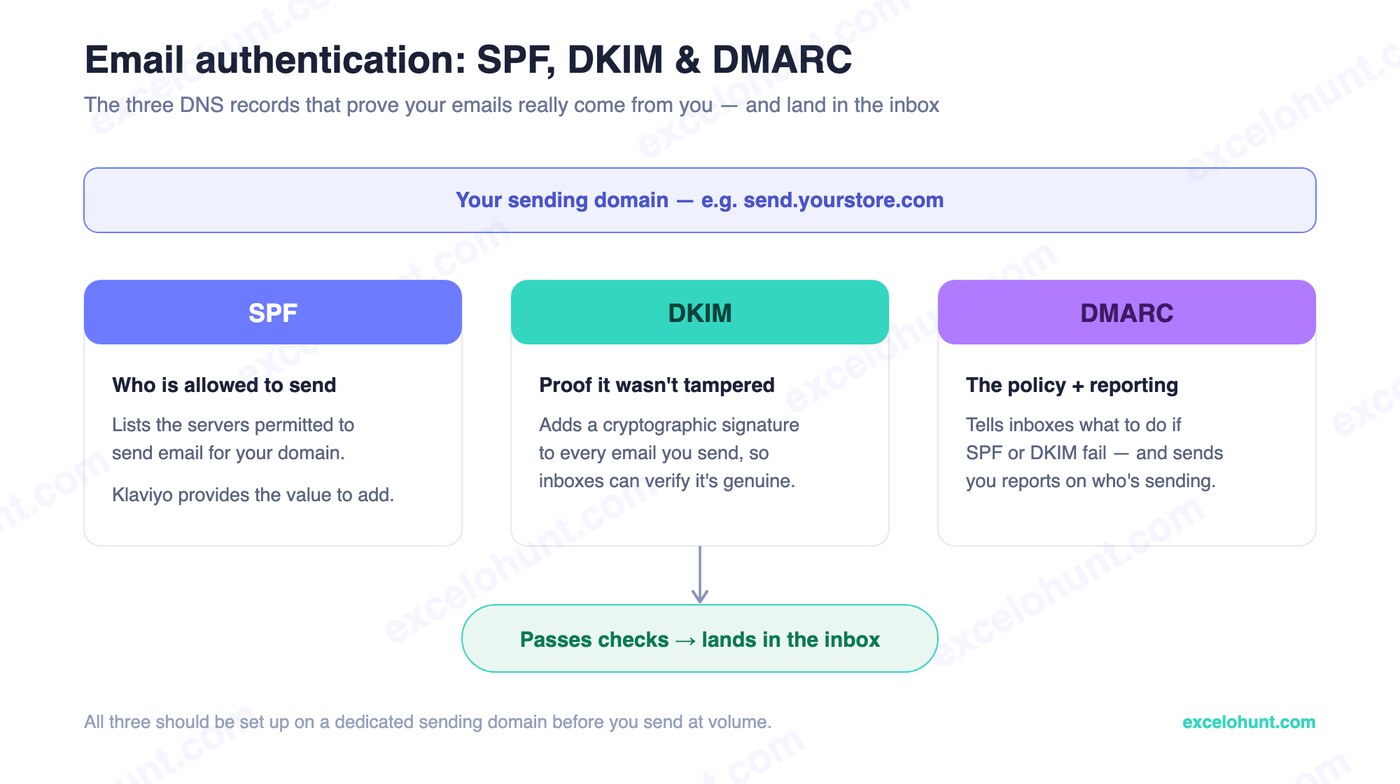
- SPF — lists the servers allowed to send for your domain.
- DKIM — adds a cryptographic signature so inboxes can verify the email wasn’t tampered with.
- DMARC — tells mailbox providers what to do if SPF or DKIM fail, and sends you reports.
Klaviyo provides the exact values to add to your DNS. Their authentication documentation walks through it record by record.
A safe DMARC rollout schedule
Don’t jump straight to full enforcement — a bad DMARC policy can bounce legitimate mail before you’ve confirmed every sending source is authenticated. Roll it out gradually:
- Month 1:
v=DMARC1; p=none; rua=mailto:[email protected];(monitor only, no enforcement) - Month 2–3: Review the DMARC reports and fix any authentication failures you find
- Month 4:
v=DMARC1; p=quarantine; pct=50;(quarantine half of failing mail) - Month 6+:
v=DMARC1; p=reject;(full enforcement)
Use a dedicated sending domain
Send from a dedicated subdomain (e.g., send.yourstore.com), not a shared Klaviyo domain or your main domain. A dedicated domain means your reputation is yours alone — you’re not affected by other senders, and you protect your root domain. This is part of the standard Klaviyo setup.
List hygiene and sunset flows
The fastest way to wreck deliverability is to keep emailing people who never open. A sunset flow gives unengaged contacts a last chance, then suppresses them — keeping your active list genuinely active.
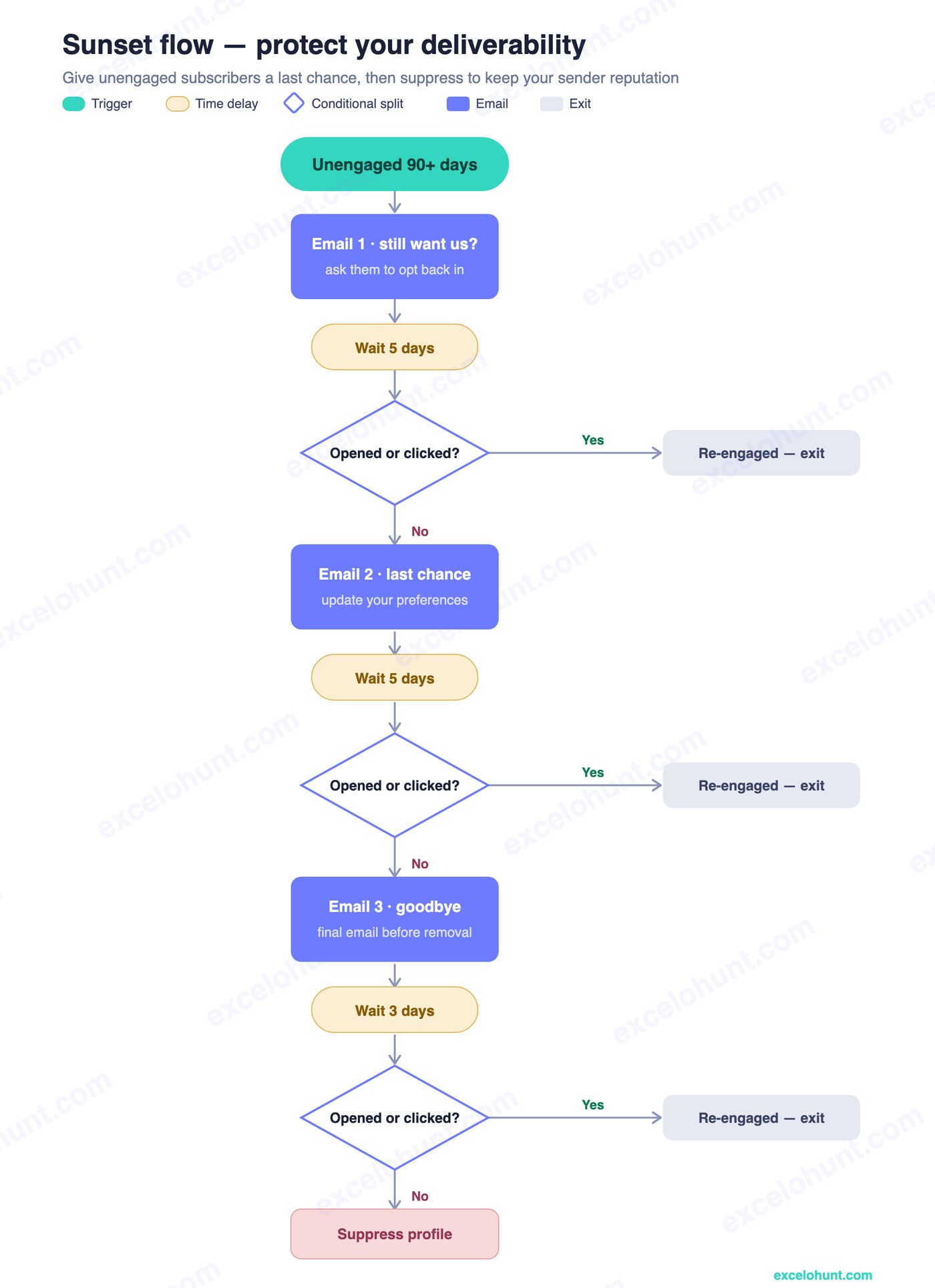
Two rules most stores get wrong:
- Cap the sunset flow at ~3 emails — don’t keep hammering people who aren’t responding.
- Define “unengaged” by email engagement (opens/clicks), not website browsing. Browsing has no impact on deliverability; email engagement is the signal mailbox providers actually watch.
Engagement segmentation
Send to your engaged segments first — people who opened or clicked in the last 30–90 days — especially for big campaigns. Consistently high engagement teaches mailbox providers that your email is wanted, which lifts inbox placement for everything you send. Past-purchasers and VIPs get longer engagement windows before suppression.
Warming a new sending domain
A brand-new domain has no reputation, so don’t blast it. Warm up by sending to your most engaged subscribers first and increasing volume gradually over 2–4 weeks. This builds positive reputation before you scale to the full list.
For genuinely high-volume senders (100,000+ emails/month) on a dedicated sending IP, warming takes longer — typically 4–6 weeks, starting with your most engaged 500–1,000 subscribers and roughly doubling reach each week. Klaviyo’s support team provides an IP-specific warming schedule; the principle is the same as domain warming, just slower and more closely monitored.
Content and subject lines that avoid spam filters
Modern spam filters read content, not just headers. A few patterns still reliably trigger them:
- Excessive “FREE,” “BUY NOW,” “ACT NOW,” “LIMITED TIME” in subject lines
- ALL CAPS subject lines or preview text, and multiple exclamation marks (!!!)
- Subject lines that don’t match the email content
- Image-only emails, or a very low text-to-image ratio (aim for at least 60/40 text-to-image)
- No plain-text version (Klaviyo generates this automatically, so this is rarely an issue)
The 2024 Google/Yahoo bulk-sender checklist
Since February 2024, Google and Yahoo enforce these requirements for anyone sending 5,000+ emails/day. Non-compliance doesn’t just hurt placement — they’ll reject the mail outright:
- DKIM authentication configured and passing
- SPF authentication configured and passing
- DMARC record published (minimum
p=none) - One-click unsubscribe header (Klaviyo adds this automatically)
- Spam complaint rate under 0.3% (aim for under 0.1%)
- Valid forward and reverse DNS for sending IPs
- From header matches the domain in your authentication records
Monitoring: tools, metrics, and cadence
Watch these as early-warning signs:
- Open-rate trend — a steady decline often means placement is slipping.
- Spam complaint rate — keep it below ~0.1% (Google’s hard threshold is 0.3%).
- Bounce rate — should stay under 1% total, under 0.5% for hard bounces.
- Use Klaviyo’s deliverability dashboard plus a seed-testing tool (e.g., GlockApps) to see actual inbox placement, and register for Google Postmaster Tools (free) for Gmail-specific reputation data.
Treat this as an ongoing practice, not a one-time setup:
- Daily (during campaigns): delivery rate and bounce rate.
- Weekly: Klaviyo’s deliverability dashboard, Google Postmaster Tools.
- Monthly: list hygiene pass (suppress unengaged, validate questionable addresses).
- Quarterly: full authentication + sending-practice audit.
Recovery plan: if you’re already in spam
It’s fixable, but it takes discipline:
- Stop blasting immediately. Pause sends to unengaged contacts.
- Verify authentication — confirm SPF, DKIM, DMARC are all passing.
- Send only to your most engaged segment (30-day openers) for 2–4 weeks to rebuild reputation.
- Run an aggressive sunset to remove dead weight.
- Re-expand slowly as placement recovers.
Pair this with the discipline in our Klaviyo best practices playbook, and route non-responders into your winback flow rather than continuing to email them.
Frequently asked questions
Why are my Klaviyo emails going to spam?
Usually one of three things: your domain isn’t authenticated (missing SPF/DKIM/DMARC), you’re sending to unengaged contacts and hurting your reputation, or you blasted a cold list too fast. Fix authentication, send to engaged segments, and run a sunset flow.
What is a sunset flow in Klaviyo?
A sunset flow is an automation that gives unengaged subscribers a final re-engagement attempt, then suppresses anyone who still doesn’t open or click. It keeps your list clean so your other emails keep reaching the inbox. Cap it at about three emails.
How do I authenticate my domain in Klaviyo?
Set up a dedicated sending domain in Klaviyo’s settings and add the SPF, DKIM, and DMARC records it provides to your DNS, then verify them. This proves your emails genuinely come from you and is required before sending at volume.
Does website browsing count as engagement for deliverability?
No. Mailbox providers judge deliverability on email engagement — opens and clicks — not on-site browsing. Define your unengaged/sunset segment by email activity, or you’ll keep emailing people who hurt your reputation.
About the author
Ravinderpal Singh is the founder of Excelohunt, a Klaviyo-focused email & SMS agency. We diagnose and fix deliverability for ecommerce brands stuck in spam.
Stuck in spam? Get a free deliverability audit and we’ll find what’s holding you back.
More in Klaviyo
- 12 Best Klaviyo Agencies in 2026 (Honest Comparison)
- Klaviyo Agency Pricing: What You Should Pay in 2026
- Optimite Alternatives: Klaviyo Email Agencies Compared (2026)
- How to Set Up Klaviyo: Complete Setup Guide (Step-by-Step)
- How to Use Klaviyo: A Beginner's Guide (2026)