Klaviyo Email Templates: 15 Free Templates + How to Build Your Own
Quick answer: The best Klaviyo email templates follow one structure — a strong subject and preview, a clear header, one hero message above the fold, scannable body/product blocks, a single prominent CTA, and a compliant footer. Build them once in Klaviyo’s drag-and-drop editor, save them as reusable templates, and adapt by type (welcome, promo, cart, newsletter). Below is the anatomy plus how to build your own.
Key takeaways
- A high-converting email has a predictable anatomy — master it once and reuse it.
- Build one template per type (welcome, promo, cart recovery, newsletter) and save them.
- One clear CTA per email beats three competing buttons.
- Mobile-first design is non-negotiable — most opens are on phones.
- Consistency comes from a small design system (colors, fonts, button styles), not from rebuilding each time.
Want ready-made templates to speed up production? Start with the structure that makes any template convert. This pairs with our Klaviyo best practices playbook.
The anatomy of a high-converting email
Every effective ecommerce email shares the same parts. Get these right and the template type barely matters:
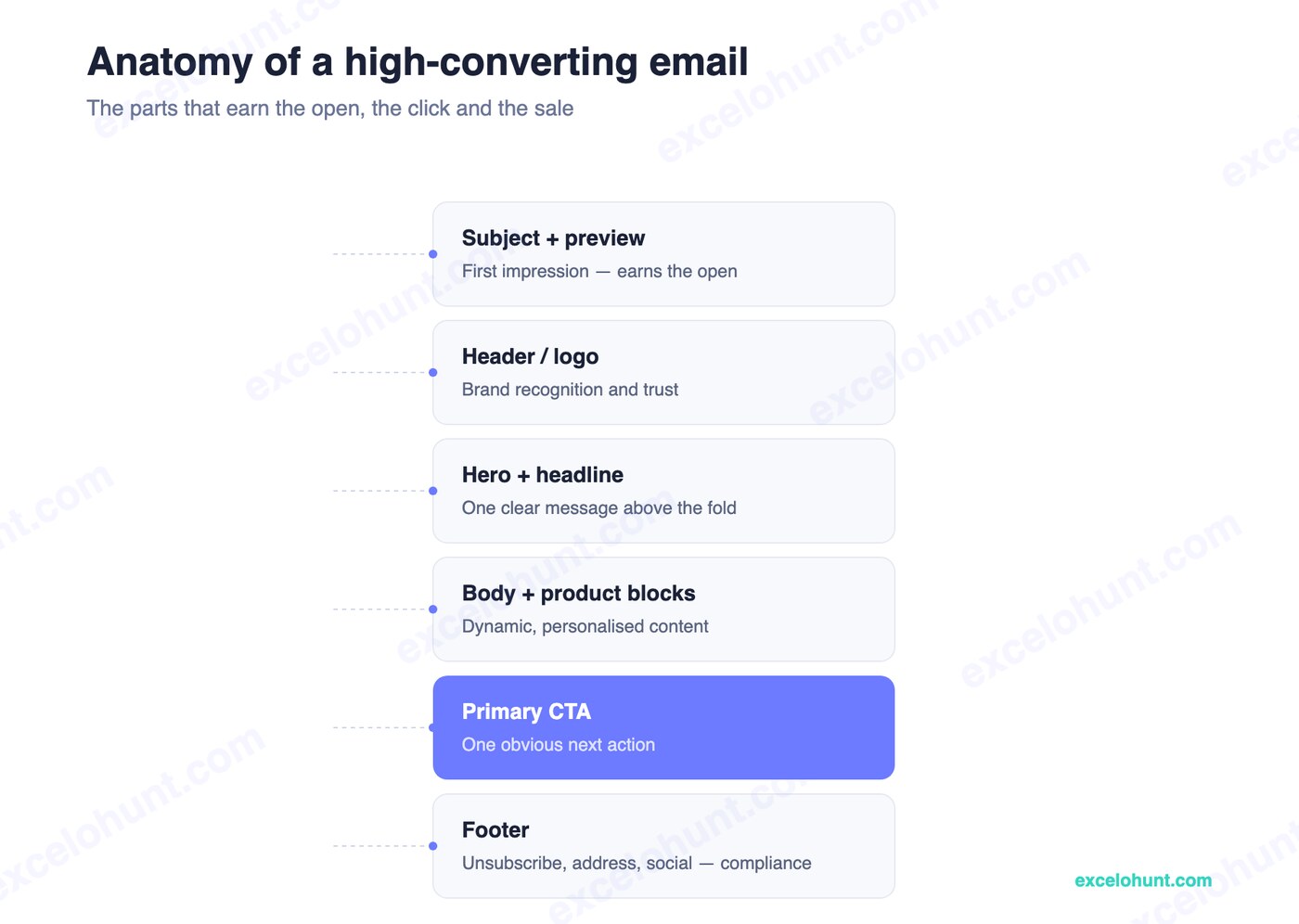
- Subject + preview text — earns the open; the single highest-leverage element.
- Header / logo — instant brand recognition and trust.
- Hero + headline — one clear message above the fold.
- Body + product blocks — dynamic, personalized, scannable content.
- Primary CTA — one obvious next action.
- Footer — unsubscribe, address, and social links (compliance, not optional).
Templates by type
Build and save one of each:
- Welcome — brand story + signup offer; warm and benefit-led. Feeds your welcome flow.
- Promo / sale — offer-forward, urgency, single strong CTA.
- Cart recovery — minimal, product-focused, with the abandoned item dynamically pulled in.
- Newsletter — editorial layout, content + a soft product tie-in.
Each is the same anatomy with a different emphasis — which is why a small set of saved templates covers most of your sending.
How to build and save a template in Klaviyo
- Go to Content → Templates → Create Template (or save any email you’ve built as a template).
- Use the drag-and-drop editor — add header, hero, text, product, and button blocks.
- Set your brand styles (colors, fonts, button shape) so every template is consistent.
- Save it with a clear name (e.g.,
Promo — single CTA) and reuse it for future sends.
Saving templates is what turns email production from hours into minutes.
Brand consistency and design systems
Don’t design each email from scratch. Define a mini design system: two or three brand colors, one or two fonts, a consistent button style, and standard spacing. Apply it across every template so your emails are instantly recognizable — and so anyone on your team can produce on-brand emails quickly. Professional email template design bakes this system in from the start.
Mobile optimization
Most subscribers open on a phone, so:
- Use a single-column layout that reflows cleanly.
- Keep text large and tappable; buttons at least 44px tall.
- Front-load the message — assume they only see the top.
- Keep a sensible text-to-image ratio so the email renders (and stays out of spam) even with images off.
Frequently asked questions
Does Klaviyo have free email templates?
Yes — Klaviyo includes a library of built-in templates you can customize in the drag-and-drop editor, and you can save your own as reusable templates. The key is adapting them to the high-converting anatomy above rather than using them as-is.
How do I create a reusable template in Klaviyo?
Build an email in the drag-and-drop editor (or open an existing one), then save it as a template under Content → Templates with a clear name. Apply your brand styles once so every future send is consistent.
What makes an email template high-converting?
A strong subject line, one clear message above the fold, scannable content, a single prominent CTA, and mobile-first design. The template type matters less than nailing this structure.
How many email templates do I need?
Most stores need just four core templates — welcome, promo, cart recovery, and newsletter — built on the same anatomy. A small, consistent set is faster to produce and more on-brand than dozens of one-offs.
About the author
Ravinderpal Singh is the founder of Excelohunt, a Klaviyo-focused email & SMS agency. We design branded Klaviyo template systems for ecommerce brands.
Want done-for-you, on-brand templates? Book a free audit and we’ll review your current design system.
More in Klaviyo
- 12 Best Klaviyo Agencies in 2026 (Honest Comparison)
- Klaviyo Agency Pricing: What You Should Pay in 2026
- Optimite Alternatives: Klaviyo Email Agencies Compared (2026)
- How to Set Up Klaviyo: Complete Setup Guide (Step-by-Step)
- How to Use Klaviyo: A Beginner's Guide (2026)