Quick answer: To connect Klaviyo to BigCommerce, install the Klaviyo integration from the BigCommerce App Marketplace and authorize it. Klaviyo then syncs customers, orders, products, and checkout events, and adds onsite tracking for browse and cart flows. Build a signup form and turn on the core flows (welcome, abandoned cart, browse, post-purchase). Basic setup takes under an hour.
Key takeaways
- Connect via the official Klaviyo app in the BigCommerce App Marketplace.
- It syncs customers, orders, products, and checkout events.
- Onsite tracking powers browse and cart flows — confirm it’s active.
- Build the same core flows as any store.
Running BigCommerce and want Klaviyo’s flows and data? Here’s how to connect them. This pairs with our how to set up Klaviyo guide and the integrations overview.
Install and connect
In the BigCommerce App Marketplace, find the Klaviyo app, install it, and authorize the connection to your Klaviyo account. This official integration is the supported path — it links your store and Klaviyo so data flows automatically.
What data syncs
Once connected, BigCommerce pushes the data Klaviyo needs:
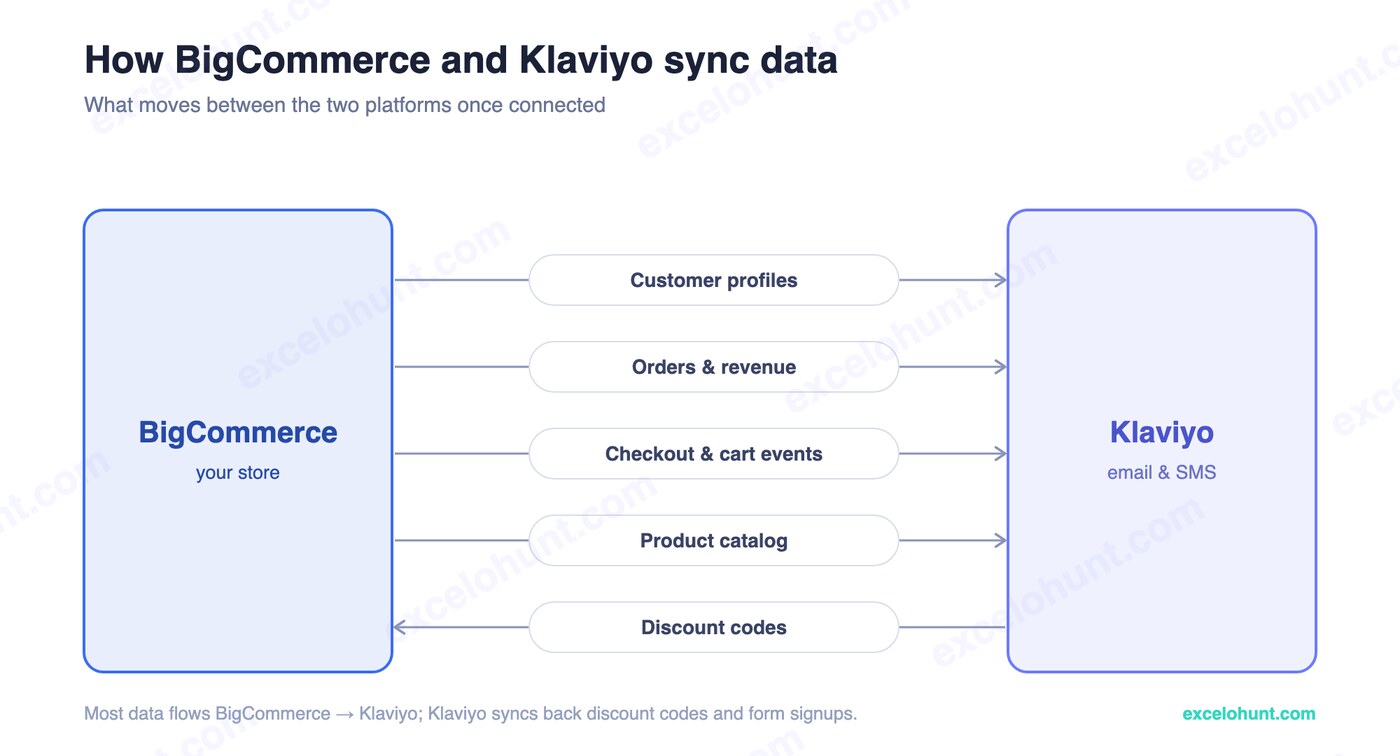
- Customer profiles — for personalization and segmentation.
- Orders & revenue — purchase history that powers segments and LTV.
- Checkout & cart events — the triggers for abandoned cart and browse flows.
- Product catalog — for dynamic product blocks and recommendations.
Let the historical backfill complete so your segments populate with real data.
Onsite tracking and forms
For browse abandonment and active-on-site tracking, the Klaviyo onsite snippet must be firing on your storefront — the integration handles this when configured. Then build a signup form in Klaviyo to grow your list and feed the welcome flow.
Essential flows for BigCommerce
The integration powers the same core automations as any platform:
- Welcome series — greets new subscribers.
- Abandoned cart — recovers BigCommerce checkouts.
- Browse abandonment — requires onsite tracking active.
- Post-purchase — onboards buyers and cross-sells.
Build these from templates with conditional splits — the full playbook is in our complete flows guide.
Troubleshooting
- Events not firing: confirm onsite tracking is enabled and the snippet loads on your theme.
- Data not syncing: re-authorize the app and check it’s the current version.
- Missing historical data: allow time for the backfill, especially on larger stores.
Frequently asked questions
How do I connect Klaviyo to BigCommerce?
Install the official Klaviyo app from the BigCommerce App Marketplace and authorize it. Klaviyo then syncs customers, orders, products, and checkout events, and enables onsite tracking for browse and cart flows.
Does Klaviyo work with BigCommerce?
Yes. Klaviyo has an official BigCommerce integration that syncs store data and enables the same core flows — welcome, abandoned cart, browse, post-purchase — that it offers Shopify and WooCommerce stores.
What data does Klaviyo sync from BigCommerce?
Customer profiles, order and revenue history, checkout and cart events, and the product catalog — everything needed to power segmentation, abandoned cart and browse flows, and dynamic recommendations.
About the author
Ravinderpal Singh is the founder of Excelohunt, a Klaviyo-focused email & SMS agency. We build Klaviyo on BigCommerce, Shopify, and WooCommerce.
Want it done for you? We build Klaviyo on BigCommerce.
More in Klaviyo
- 12 Best Klaviyo Agencies in 2026 (Honest Comparison)
- Klaviyo Agency Pricing: What You Should Pay in 2026
- Optimite Alternatives: Klaviyo Email Agencies Compared (2026)
- How to Set Up Klaviyo: Complete Setup Guide (Step-by-Step)
- How to Use Klaviyo: A Beginner's Guide (2026)
Want Us to Implement This for Your Brand?
Get a free email audit and see exactly where you're losing revenue.
Get Your Free Audit